

Receive a crypto (USDC) deposit
Move USDC from another wallet or an exchange into MozaikPay.
If you already hold USDC somewhere else, you can send it straight into your MozaikPay wallet. This works on a brand new account, no identity verification needed.
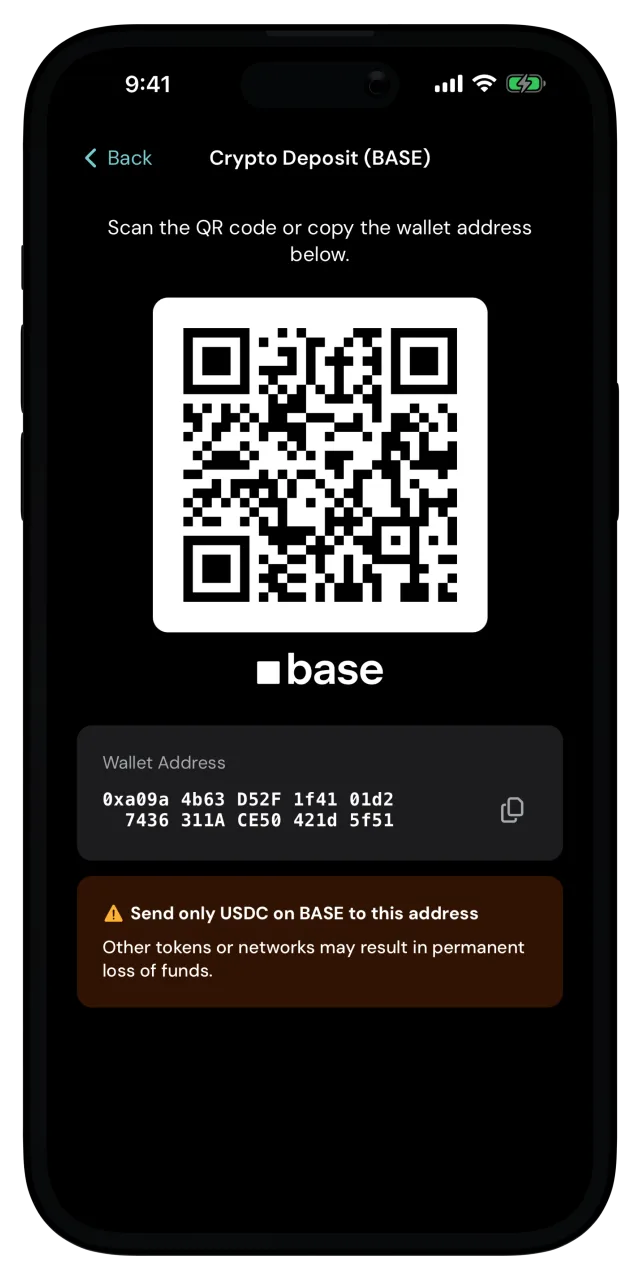
Send only USDC on Base
Your wallet accepts USDC on the Base network. Sending another token to your address, or on another network may result in a permanent loss of funds.
Open your deposit address
Tap Deposit on the home screen, then Crypto Deposit. The Crypto Deposit (BASE) screen shows your wallet address as a QR code, with the address written out below it.
Send USDC from the other app
Copy the address with the button next to it, or scan the QR code from the app you're sending from.
Then start a USDC withdrawal there and paste your MozaikPay wallet address as the destination. When it asks which network to use, choose Base. If Base is not supported in the third-party app, do not use it for sending the USDC balance.
Wait for it to land
Once the transfer confirms on Base, the digital dollars show up in your balance, and the deposit appears in your recent activity on the home screen.
Your deposit address doesn't change, even when you change phones, so you can save it and reuse it for every deposit.
Sending from somewhere new?
If you want to be careful, send a small amount first, before sending the rest of the amount.
Ready to move USDC from your MozaikPay wallet to somewhere else? See Withdraw crypto (USDC).